YouTube Complete Guide
Everything YouTube: channel creation, setup, optimization, and content strategy.
12 min
Loading...
Ready to start automating?
Join hundreds businesses growing with Renderfire
Everything YouTube: channel creation, setup, optimization, and content strategy.
Join hundreds businesses growing with Renderfire
Create a YouTube Brand Account (not personal account) for professional features and team management. Verify with phone number to unlock custom thumbnails. Unlike TikTok/Instagram, YouTube doesn't require warmup—start uploading after setup. Prepare 3-5 videos before promoting, create thumbnail templates for consistency, and optimize every video for search from day one. YouTube growth takes 6-12 months of consistent effort.
Setting up your YouTube channel properly from the start establishes credibility and helps viewers understand what your channel offers. Your channel art, description, and organization tell viewers whether you're a serious creator worth subscribing to or someone who just started yesterday with no clear direction. Professional setup builds trust and improves your chances of turning casual viewers into subscribers.
Fresh channels provide a clean slate with full control over credentials and channel direction.
Clean history means no baggage. When you create a fresh YouTube channel, you start with a blank slate-no previous community guideline strikes, no content ID issues from a previous owner, and no questionable videos that could affect your channel's standing. This clean record is invaluable for building a professional brand.
Full control over your channel. You control the Google account credentials and Brand Account settings. If something goes wrong, you can recover the account. If you need to verify your identity or appeal a decision, you can. This isn't possible with bought channels where the original owner might retain Google account access.
Brand Accounts vs Personal Accounts. YouTube offers two types of channels. Personal channels are tied directly to your Google account and use your personal name. Brand Accounts let you use a business name, add multiple managers, and keep your personal Google account separate from your channel. For business purposes, Brand Accounts are almost always the better choice.
Sign in to YouTube with your Google account. Use a dedicated Google account for your business or brand, not your personal one. This separates your business activities from personal use and makes it easier to manage team access later if needed.
Create a Brand Account for business channels. Go to YouTube settings and create a Brand Account rather than using your personal name. Brand Accounts allow multiple managers (you can add team members), let you use a business name instead of your personal name, and appear more professional to viewers.
Choose a memorable channel name that reflects your niche. Your channel name should be easy to spell and remember so people can search for you. It should clearly relate to your content niche so viewers immediately understand what you create. Check that the name is available as a domain and on other social platforms for consistent branding across platforms.
Add a high-quality profile picture (800x800px minimum). Your profile picture appears next to every video, comment, and interaction. Use a clear, professional image that's recognizable even at small sizes. For personal brands, use a professional headshot. For business brands, use your logo. Maintain consistency with your overall brand aesthetic across all platforms.
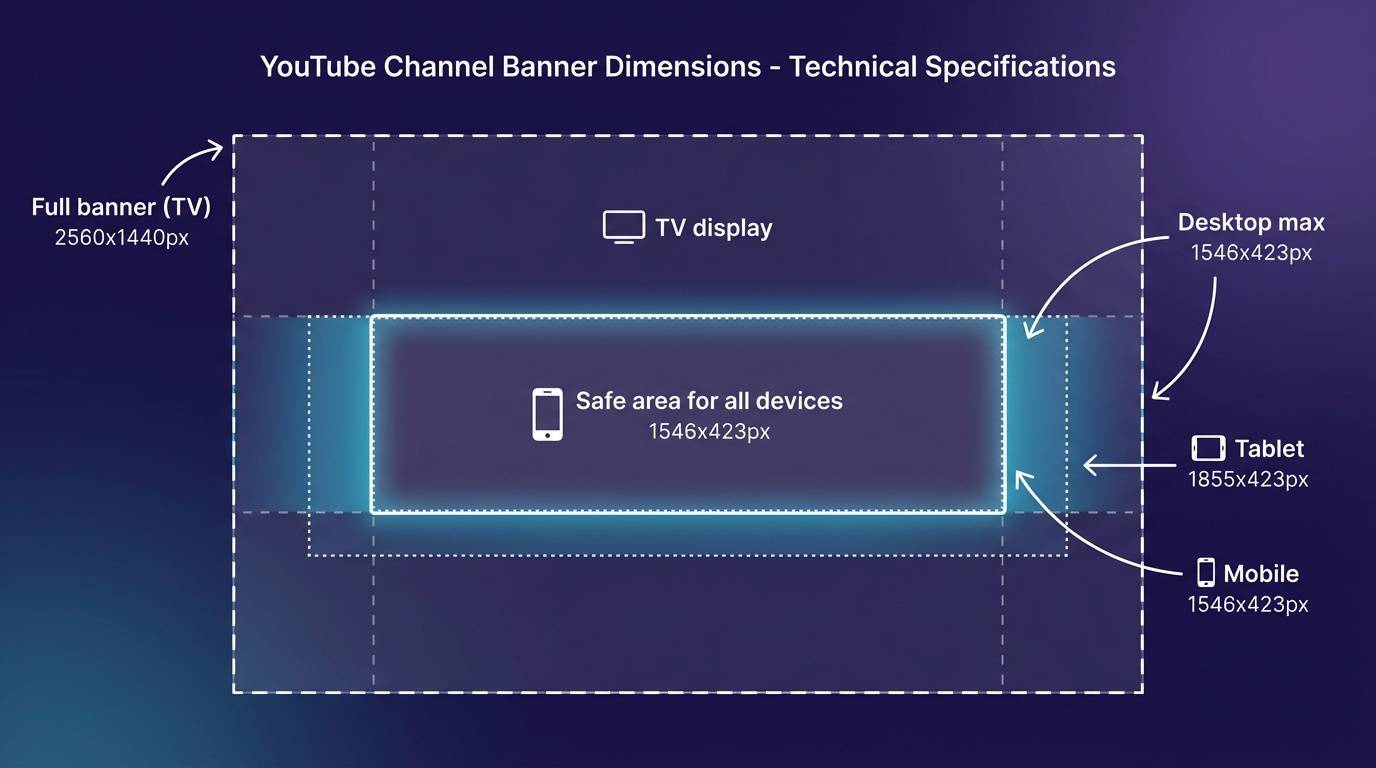
Create a banner that works across all devices (2560x1440px). YouTube displays your banner differently on TV, desktop, tablet, and mobile. The "safe area" (1546x423px in the center) appears on all devices-keep all important text and visuals within this area. Use Canva or Photoshop templates specifically for YouTube banners to ensure proper sizing.
Include your value proposition in the banner text. Viewers should immediately understand what your channel offers. "Learn Social Media Marketing" is clearer than "John's Channel." Your upload schedule if you have one ("New videos every Tuesday"). Any social media handles or website URLs you want to promote.
Match your overall brand colors and style. Consistency builds recognition. Use the same color palette across your banner, thumbnails, and profile picture. This creates a cohesive, professional look that makes your channel memorable.
Write a clear description of what viewers can expect (1000 characters). The first 100-150 characters appear in search results-make them count. Clearly state your niche and what value you provide. Include relevant keywords naturally for SEO without keyword stuffing.
Good Example:
Welcome to Social Media Success! We help entrepreneurs and marketers grow their business through organic social media strategies.
New tutorials every Tuesday and Thursday covering TikTok, Instagram, and YouTube growth. Subscribe for actionable tips you can implement today.
🔗 Free resources: SocialMediaSuccess.com
📧 Email: hello@socialmediasuccess.com
📱 Instagram: @socialmediasuccess
Include relevant keywords for search optimization. YouTube uses your description to understand your channel's topic. Include terms people search for in your niche naturally throughout your description. Focus on 3-5 primary keywords that define your channel's core content.
Add links to your website, social media, and email. The description is one of the few places you can include clickable links. Add your website, newsletter signup, social media profiles, and contact email. This makes it easy for interested viewers to connect with you beyond YouTube.
Verify your account with a phone number immediately. Verification unlocks critical features like custom thumbnails (essential for performance), videos longer than 15 minutes, live streaming, and appeals for content disputes. Without verification, you're severely limited in what you can do.
Enable monetization when eligible (1,000 subscribers, 4,000 watch hours). Apply for the YouTube Partner Program once you meet the requirements. This enables ad revenue on your videos and provides additional features. Even if monetization isn't your primary goal, it signals credibility and professionalism to viewers.
Set up default upload settings to save time. Go to YouTube Studio → Settings → Upload defaults. Set default visibility (usually Public or Unlisted for review first). Add standard tags you'll use on every video. Include default description text with your social links so you don't forget to add them. These defaults save time on every upload and ensure consistency.
Enable community tab (1,000 subscribers) for extra engagement. Once available, the Community tab lets you post updates, polls, and images between videos. This keeps your channel active and engaging even when you're not uploading. Polls are particularly valuable for audience feedback and engagement.
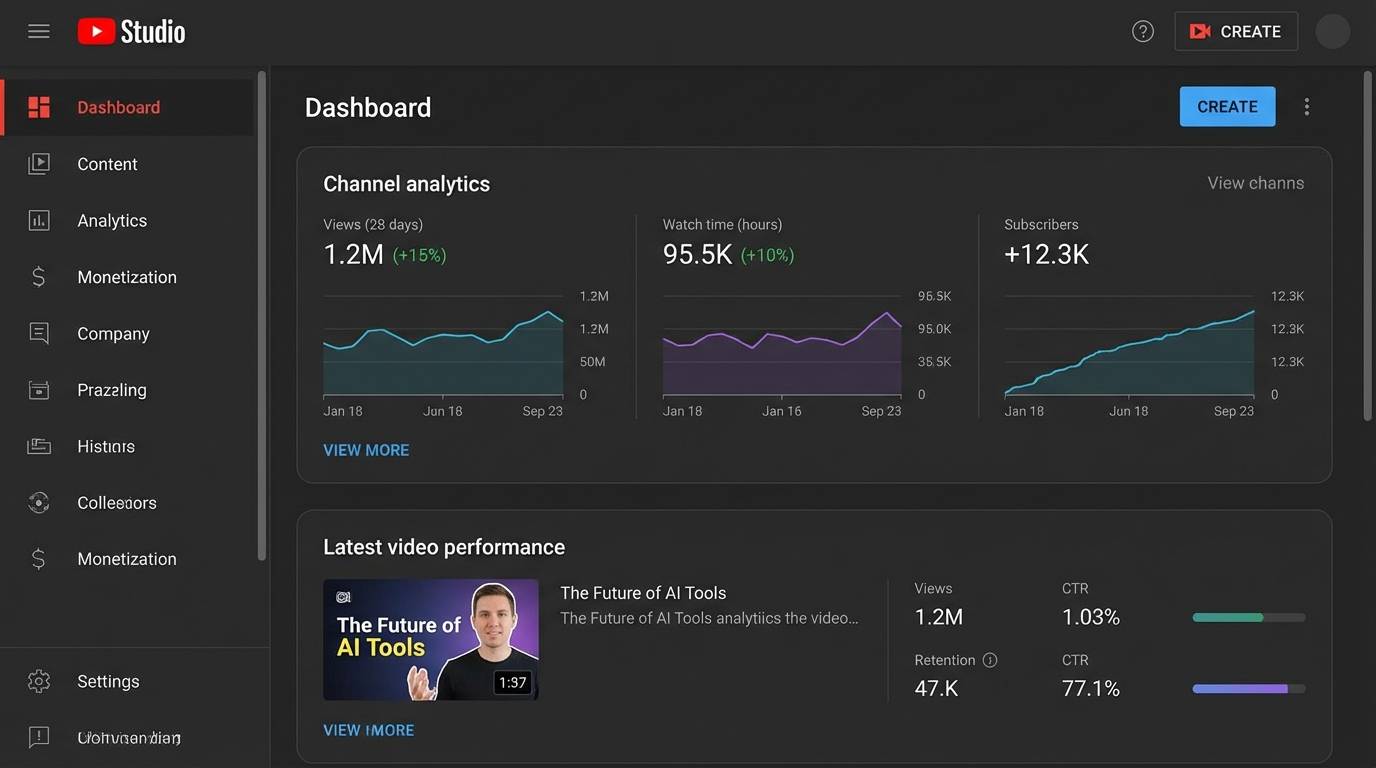
Group related videos into playlists for better discovery and session time. Playlists increase watch time by auto-playing related videos, improve SEO (playlists rank in search separately from videos), help viewers find specific topics quickly, and create a more professional, organized appearance.
Create at least 3-5 topic-based playlists. Even if you only have a few videos, create playlists for your main content categories. Add future videos to appropriate playlists as you upload them. Name playlists clearly with keywords viewers might search.
Feature your best content for new visitors. Go to Channel Customization to control what visitors see first. Feature your most popular or most important video at the top for unsubscribed visitors. For subscribers, feature your latest upload so they always see new content. Create sections to organize playlists and make your channel easy to navigate.
Add a channel trailer for new visitors (30-60 seconds). Your trailer auto-plays when non-subscribers visit your channel. Explain what your channel offers in 30-60 seconds. Include a clear call-to-action to subscribe. Show your personality and editing style so viewers know what to expect. Update your trailer every 6-12 months as your channel evolves.
Feature video for returning subscribers. This auto-plays for subscribers when they visit your channel. Feature your latest upload or an important announcement. This ensures subscribers always see your newest content and increases view counts on recent videos.
YouTube has different algorithm dynamics than TikTok or Instagram.
YouTube is Different: Unlike TikTok or Instagram, YouTube doesn't require a strict "warmup period" of engagement before posting. YouTube's algorithm is primarily search and recommendation-based, not behavior-pattern based like short-form platforms. You can start uploading immediately after setup.
What matters on YouTube: Instead of warmup behavior, YouTube prioritizes watch time, click-through rate (CTR), and audience retention. Focus on creating high-quality content with compelling thumbnails and titles. The algorithm will evaluate your videos based on performance metrics, not your account's engagement history.
Pre-launch strategy instead of warmup: Rather than scrolling and engaging for 7 days, spend that time creating 3-5 quality videos. Having multiple videos ready gives visitors more content to watch, improving retention and subscription rates. Study successful channels in your niche to understand what formats work. For cross-platform warmup strategies, see our Account Warmup Essentials Guide.
Create 3-5 videos before promoting your channel. Having multiple videos available when viewers discover you increases the chances they'll subscribe. They can binge your content and get a better sense of what you offer. This also lets you establish a consistent posting schedule from day one without the pressure of creating while promoting.
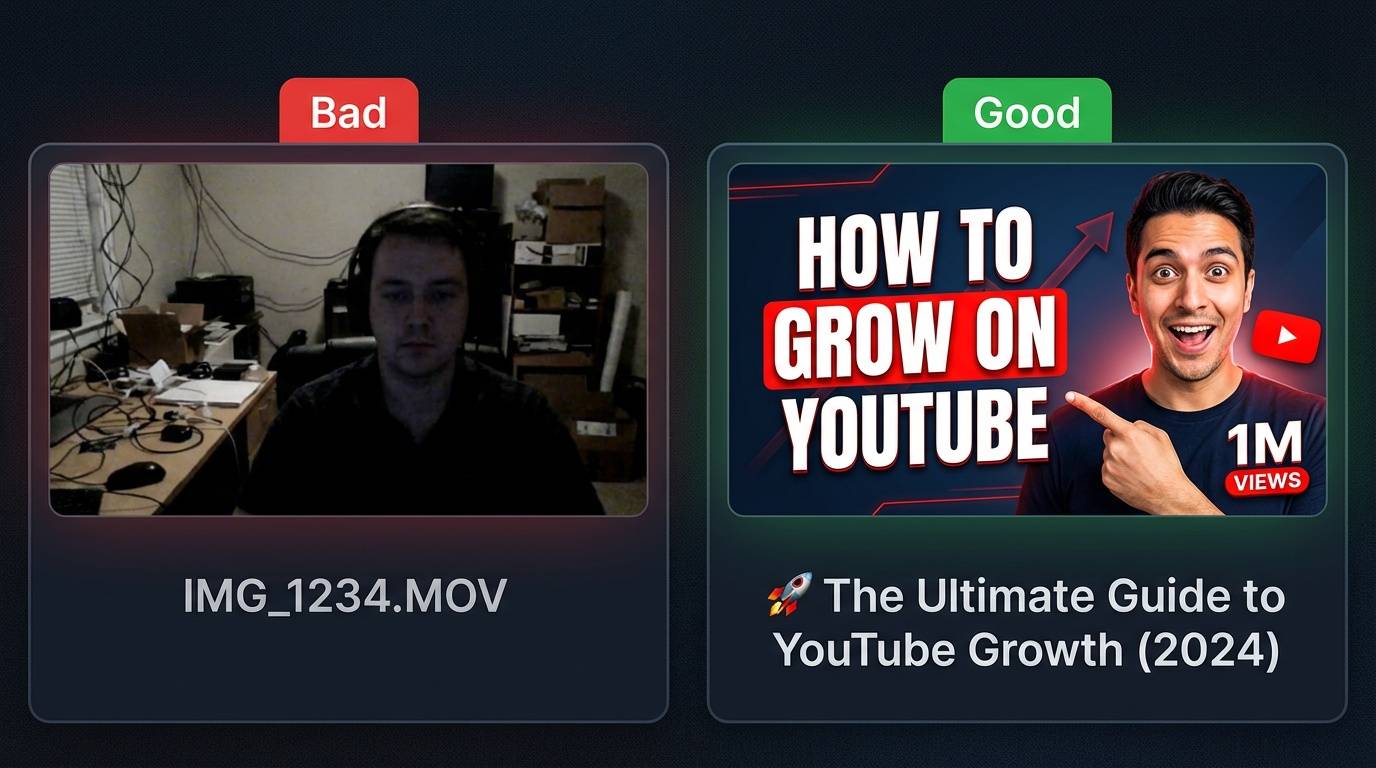
Professional quality matters from day one. Your first videos set the expectation for all future content. Use good lighting-viewers should see you clearly, not a silhouette. Ensure audio is clear and audible-poor audio is the #1 reason viewers click away. Invest in a decent microphone before worrying about camera quality.
Target 8-12 minute videos for optimal performance. This length is ideal for both engagement and monetization. Videos over 8 minutes unlock mid-roll ads, significantly increasing ad revenue potential. The 8-12 minute range is long enough to deliver substantial value while short enough to maintain viewer attention. Of course, let your content dictate length—don't pad videos to hit a target or rush to cut them short.
Develop a content calendar and posting schedule. Decide on a sustainable upload frequency (1x per week minimum, 2-3x per week optimal). Plan your content topics 2-4 weeks in advance. Batch create content when possible to stay ahead of your posting schedule. Communicate your schedule to viewers in your banner and description.
Create thumbnail templates for consistency and efficiency. Design 2-3 thumbnail templates in Canva or Photoshop that match your brand colors and style. Templates should allow for different text and images while maintaining visual consistency. This saves time on every upload and builds brand recognition-viewers start to recognize your thumbnails before reading titles. For tips on maintaining consistent character appearance across AI-generated visuals, see our guide on character consistency in AI generation.
Watch and learn from successful channels in your niche. Study 5-10 channels similar to what you want to create. Analyze their video structures, thumbnail styles, title formulas, and content topics. Note what gets the most views and engagement. You're not copying-you're learning what works in your space and adapting it to your unique voice and expertise.
With your channel properly set up, you're ready to start creating and promoting your content strategically.
Upload your first 3-5 videos within the first week. This gives new visitors multiple videos to watch, which improves subscription rates. Space uploads 2-3 days apart so your early subscribers get regular content without being overwhelmed. Each video should be your best work-you're establishing the quality standard viewers will expect from your channel.
Optimize every video for search from day one. YouTube is a search engine. Use keyword-rich titles, detailed descriptions with timestamps, and relevant tags on every video. Research keywords using YouTube's autocomplete feature and free tools like Google Trends. Optimize for keywords with decent search volume but realistic competition for a new channel. Use our free YouTube Tag Generator to find relevant tags for your videos.
Create custom thumbnails that stand out in search results. Thumbnails are the primary factor in whether people click on your video. Use high-contrast colors, clear readable text (3-5 words max), emotional facial expressions if featuring people, and consistent branding across thumbnails. Test different styles on your early videos to learn what works for your audience.
Respond to every comment in the first few weeks. Early engagement signals to YouTube that your videos spark conversation, which boosts recommendations. Responding to comments encourages more comments on future videos. It builds community and loyalty with your early subscribers who will become your biggest advocates. Reply within the first few hours for maximum impact.
Promote your channel strategically without spamming. Share videos on relevant social media platforms and communities where your target audience hangs out. Don't just drop links-provide context for why your video adds value. Engage genuinely in those communities beyond just promoting your content. Consider running small paid promotions to jumpstart discovery if you have budget.
No. Unlike TikTok or Instagram, YouTube doesn't require a warmup period of engagement before posting. YouTube's algorithm is search and recommendation-based, not behavior-pattern based. You can start uploading immediately after channel setup. Spend your pre-launch time creating 3-5 quality videos instead.
Use a Brand Account for business purposes. Brand Accounts allow you to use a business name instead of your personal name, add multiple managers for team collaboration, and keep your personal Google account separate from your channel. Personal accounts work for casual creators, but Brand Accounts are essential for professional use.
YouTube growth is typically slower than other platforms but more sustainable. Most successful channels see meaningful traction after 50-100 videos and 6-12 months of consistent effort. Unlike short-form platforms where content has a short lifespan, YouTube videos can generate views for years through search and recommendations.