Instagram Complete Guide
Everything Instagram: account creation, warmup, profile optimization, and content strategy.
12 min
Loading...
Ready to start automating?
Join hundreds businesses growing with Renderfire
Everything Instagram: account creation, warmup, profile optimization, and content strategy.
Join hundreds businesses growing with Renderfire
Create fresh Instagram accounts (never buy them), switch to Business/Creator account for analytics and links, then complete a 5-7 day warmup where you engage but don't post. Start with 1-2 Reels daily, engage 2-5 minutes before and after each post, and test 100+ formats to find your winner. Don't make content that looks like ads—focus on value.
Successfully creating an Instagram account requires more than just posting photos. Creating fresh accounts is safer than buying accounts, and proper account setup and "warming up" are crucial for success. The first step to getting views on Instagram is to NOT look like a bot. This is why we will be using brand new accounts and warming them up properly.
Fresh accounts provide a clean slate with full control over credentials and recovery methods.
Clean history means no baggage. When you create a fresh Instagram account, you start with a blank slate-no previous violations, no shadowbans lurking from a previous owner, and no questionable activity that could flag the algorithm against you from day one. This clean record is invaluable for building algorithmic trust.
Full control over your account. You control the credentials, recovery email, and phone number. If something goes wrong, you can recover the account. If you need to verify your identity, you can. This isn't possible with bought accounts where the original owner might retain access or reclaim the account at any time.
Better algorithm standing from the start. Fresh accounts that follow proper warmup procedures actually have better algorithm standing than older accounts that weren't set up correctly. The algorithm doesn't favor old accounts-it favors accounts that behave like real, engaged users from the beginning.
Follow these steps to create a new Instagram account properly.
Download Instagram app from your device's app store. Always use official sources. Never download from third-party websites that might contain malware or modified apps that violate Instagram's terms.
Create account with email or phone-more secure than Facebook login. Direct email/phone signup gives you full control over account recovery. Facebook-linked accounts create dependencies and potential security risks if your Facebook account is ever compromised.
Choose memorable username that reflects your niche or brand. Your username should be easy to spell and remember, related to your content category, consistent across other platforms if possible, and professional (avoid excessive numbers or special characters).
Add high-quality profile picture that represents your brand. Your profile picture appears next to every post, comment, and interaction. Make it recognizable at small sizes, consistent with your overall brand aesthetic, and professional quality-not blurry or poorly lit.
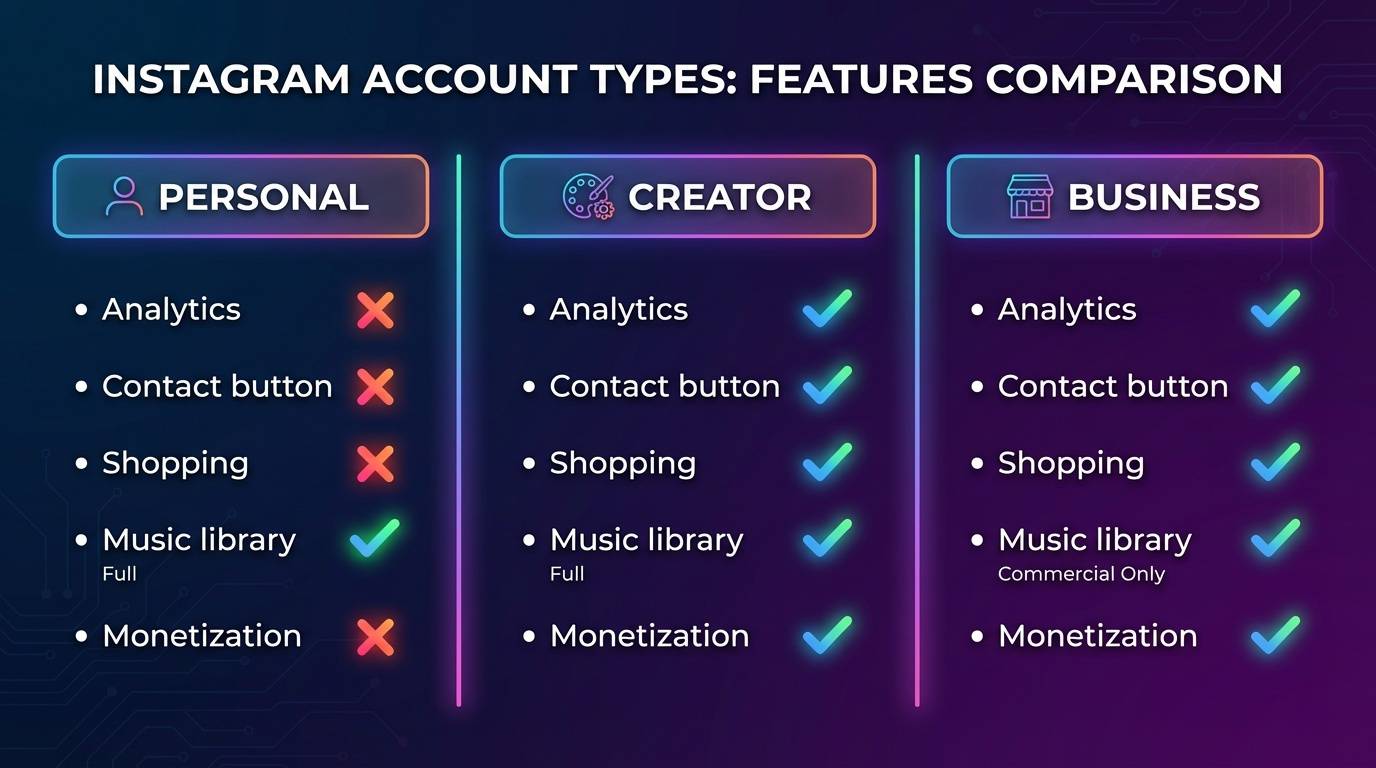
Switch to Business/Creator account to add website links and access analytics. Regular personal accounts can't add clickable links in bio (except one link) or access detailed analytics. Business/Creator accounts unlock these essential features. This switch is free and reversible if needed.
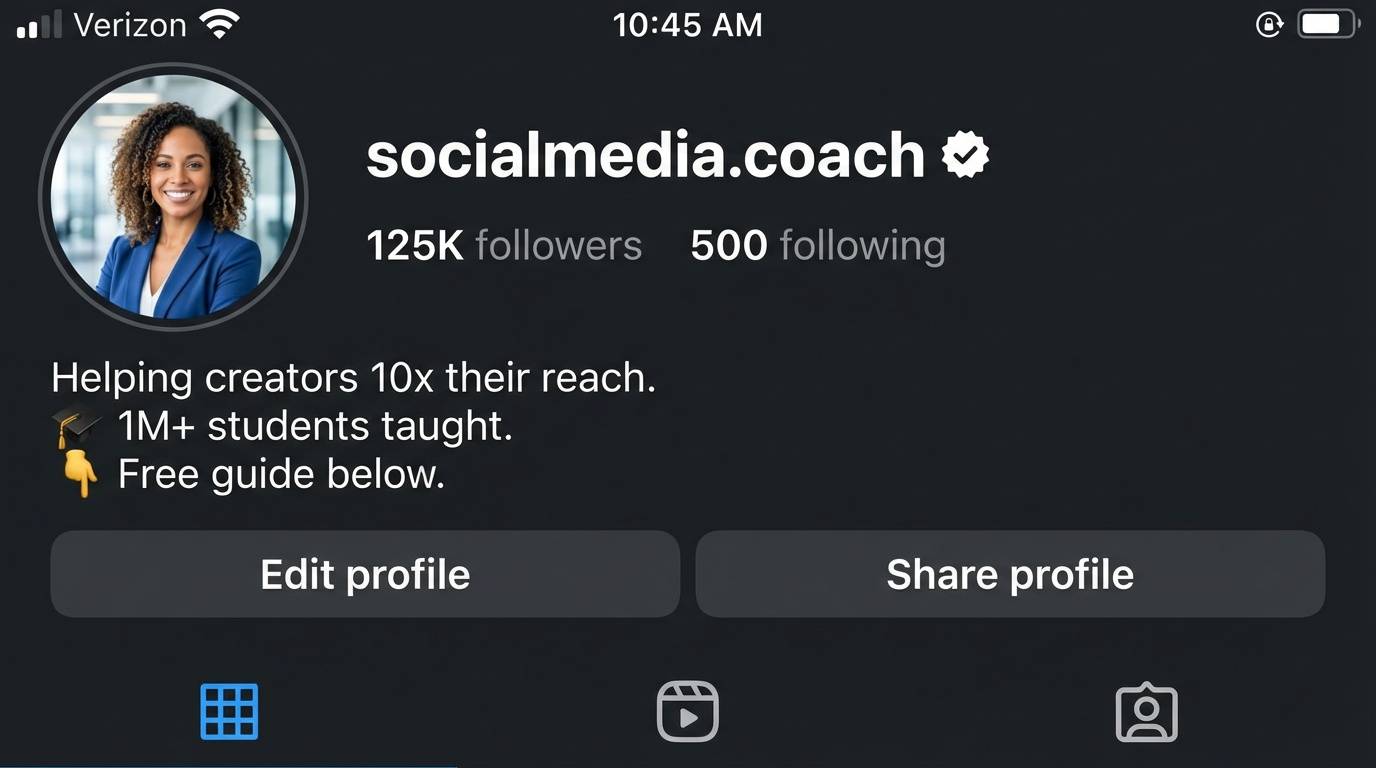
Write compelling bio with CTA-include link and value proposition. Your bio has limited space, so every word must earn its place. Clearly communicate what value you provide, include relevant keywords for discoverability, add a clear call-to-action directing visitors to your desired action, and use the link strategically (to landing page, product, or link-in-bio tool).
Your profile is your first impression. Optimize every element to convert visitors into followers.
Business accounts are ideal for brands, companies, and e-commerce businesses. They provide access to Instagram Shopping, detailed analytics, and advertising tools. You can also add contact buttons (email, phone, directions).
Creator accounts are designed for influencers, content creators, and public figures. They offer similar analytics to business accounts but with more flexibility in categorization and DM filtering options. Choose based on your primary goal.
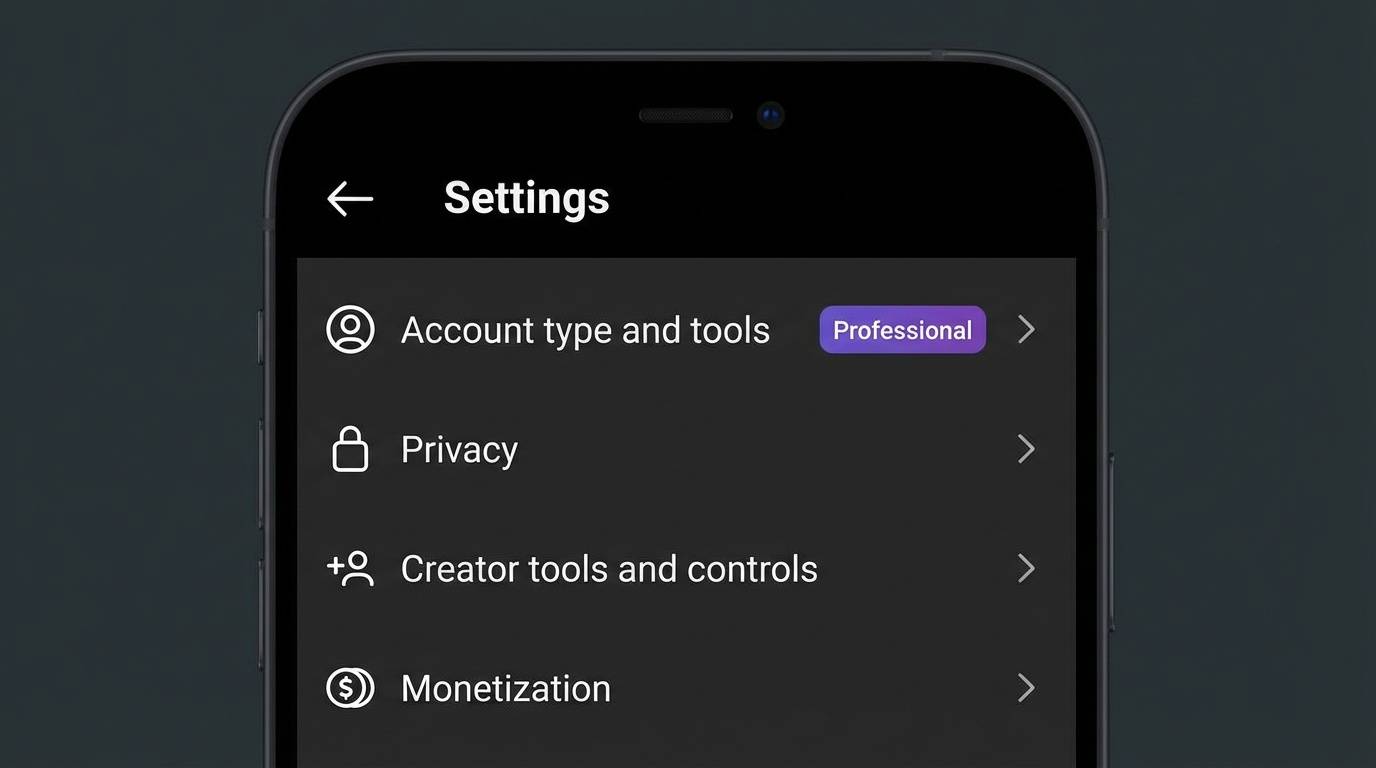
The main goal with your bio is to make sure anyone who reads it knows how to get your thing, or to your site, and WHY they should go there. For Instagram, add your website link by switching to a Business/Creator account.
"Helping entrepreneurs scale to 6 figures | Free masterclass ↓"
Clear value proposition + directional arrow to link
"Plant-based recipes for busy people | Download our app below"
Target audience + solution + CTA
"Professional photography tips | Book a shoot"
Content focus + service CTA
"Skincare that actually works | Shop the collection"
Value claim + product CTA
"Daily motivation for success | Join 100k+ achievers"
Consistency promise + social proof
"Travel guides & hidden gems | Plan your trip"
Unique angle + action CTA
Since Instagram only allows one clickable link in your bio, use link-in-bio tools to maximize that single link. Tools like Linktree, Beacons, or Stan Store let you create a landing page with multiple links. This way, your bio link can direct to your website, shop, latest content, and other social profiles all at once.
Before posting any content, you must complete a 5-7 day warmup period to build algorithm trust.
Why warmup matters: Instagram's algorithm evaluates whether accounts are real people or bots. Real people browse, engage, and then create. Bots create immediately. The warmup period establishes you as a genuine user before asking the algorithm to promote your content.
The #1 mistake people make when trying to do organic marketing is they skip the warm up phase. Warming up means NO POSTING, but just using the account like a human who is interested in the content they are viewing. The easiest way to avoid 0 view jail on Instagram is to warmup a NEW account for 7 days.
Instagram-specific tip: 7 days is the safest warmup duration. You can do 3 days, but 7 is recommended to be safe. Once you warmup an account you can post as much as you want, and the algorithm will show your content to the right people. Instagram seems to be more forgiving than TikTok once properly warmed up. See our detailed Account Warmup Essentials Guide for the full day-by-day protocol.
After the warmup period (Days 6-7), post your first high-quality Reel following this checklist.
Professional quality matters from day one. Your first Reel sets the algorithmic expectation for all future content. Use good lighting-viewers should see you clearly, not a silhouette. Ensure audio is clear and audible-people will scroll past if they can't hear you. These production basics are non-negotiable.
Stay relevant to your niche. If you spent 7 days engaging with fitness content, your first Reel should be fitness-related. This consistency tells the algorithm exactly who to show your content to. Posting random content after a niche-specific warmup confuses the algorithm and tanks your reach.
Provide genuine value or entertainment. Your Reel must deliver on whatever promise the hook makes. If your hook says "3 tips to lose weight," the Reel better contain 3 actionable weight loss tips. Clickbait without payoff destroys retention and tanks future posts.
Use trending but appropriate sounds. Choose a trending sound from Instagram's library that matches your content vibe. Trending sounds get an algorithm boost, but the sound must fit your video-don't force a trending sound that doesn't make sense with your content.
Include relevant hashtags. Mix large hashtags (1M+ posts) for potential reach, medium hashtags (100K-1M) for realistic ranking, and niche hashtags (under 100K) for targeted audiences. 5-10 hashtags is optimal.
Strong hook in the first 1 second. Instagram users scroll faster than other platforms. You have one second to stop the scroll. Show the result, ask an intriguing question, make a bold statement, or create a pattern interrupt. Text overlay in the first frame catches people scrolling with sound off.
After 7 days of warmup, you're ready to start making content. You want to find your "winning format"— content that consistently gets 1000+ views and comments from people who could actually use your product (your ICP - Ideal Customer Profile).
Step 1: Download CapCut. CapCut is a free video editor designed for short-form content creation. It has all the features needed for recreating viral Reel formats: templates, trending sounds, effects, and mobile-optimized editing. The interface makes it easy to replicate successful formats you saved during warmup.
Step 2: Get Viral Audio. Download audio from trending Reels to reuse. Trending sounds get algorithmic boosts-Instagram groups trending audio together and promotes it. Never upload original audio initially; Instagram heavily favors native sounds from its library. Even for talking-head content, add a low-volume trending sound underneath.
Step 3: Recreate Format, Keep Hook/Format, Change Context to Your Niche. Study the viral Reels you saved during warmup. Identify the hook structure, format, and flow. Keep these elements but change the context to your niche. If a viral format shows "3 mistakes everyone makes with..." about cooking, adapt it to your niche: "3 mistakes everyone makes with marketing." The format is proven-you're just applying it to your audience.
Step 4: Focus on Algorithm-Watch Time + Comments are Key Metrics. Instagram's algorithm prioritizes two main signals: watch time (do people watch your Reel all the way through?) and engagement (do people comment, like, save, share?). Create content that holds attention until the end-completion rate is critical. Encourage comments through questions, controversial-but-respectful takes, or calls-to-action asking for opinions. Track your performance with our free Instagram Engagement Calculator.
Step 5: Test & Double Down-Find Your Winning Format Through Iteration. Post different formats and track performance. Which hooks get the best retention? Which topics drive the most engagement? Which formats get shared? Once you identify your top 2-3 performing formats, create more content using those structures. Don't keep randomly experimenting once you find what works-scale your winners.
When you make a Reel, make sure the caption, first comment, or end of Reel CTA is related to your business. If you just want views but no downloads, what's the use?
Caption CTA connects content to your offer. Example: "Do these hobbies and 1000+ more on our app 'Hobby Hub'" directly tells viewers how to access more value. The CTA is specific (name of app) and quantifies value (1000+ hobbies). Place this in your caption so it's immediately visible.
Pinned Comment CTA gets high visibility. Pin your business CTA as the first comment for maximum exposure. Comments appear directly under the Reel, making them highly visible. Example: "Download FitLife app (link in bio) for personalized workout plans!" People scrolling comments will see this first.
In-Content CTA embeds your business in the Reel itself. Put your business/product in the actual Reel content: end screens showing your logo and app name, background elements subtly displaying your brand, verbal mentions woven naturally into content. This works especially well because many viewers don't read captions or comments but do watch the video.
Make sure you are posting through the mobile app, not the web or third-party scheduling tools. When you first start posting, you NEED to scroll for 2-5 mins and interact with content BEFORE and AFTER each post. This makes the algorithm think you're a real person, not a bot. Scheduling content right away = shadowban.
First 1-2 weeks: Start with 1-2 Reels per day maximum. Posting 5-6 Reels daily right away looks like spam to the algorithm. Start conservatively-one quality Reel that gets 1000 views beats five rushed Reels that get 100 views each. The algorithm is still evaluating whether your account provides value. Prove it through quality and genuine engagement, not volume.
After 2 weeks: Can increase to 1-3 Reels per day if getting 500+ views consistently. Once you've established that your content resonates (consistent 500+ views), you can safely increase frequency. The algorithm now trusts your account. More frequent posting multiplies your viral opportunities without cannibalizing individual Reel performance.
Key Takeaway: Posting 1-2 Reels daily with real creative thought is much better than spraying out 3, 4, 5, 6+ a day right away. Consistency matters more than volume. A sustainable pace you can maintain for months beats an unsustainable sprint you'll burn out from in two weeks. The algorithm rewards predictable patterns, not erratic bursts.
Use the Reels you saved during warmup as inspiration. Try to see what other apps are doing (can even look at successful accounts in your niche), and keep trying new formats. This is all about testing.
Once you find a winning format, double down on it. Each app's "winning format" is unique and this may take more than a month to find a true winner. It took some creators 300+ Reels to find their breakthrough format. Don't expect instant success-expect systematic iteration. When you identify a format that consistently performs (1000+ views, strong engagement, relevant comments), create more variations using that structure.
You're not allowed to feel discouraged until you've tried 100 times. 100 formats. Most creators give up after 10-20 posts, right before they would have found what works. Commit to testing 100 different approaches before evaluating whether Instagram works for your business. For authentic content approaches that build real connections, see our UGC marketing guide-the principles apply across platforms.
A proper warmup takes 5-7 days minimum (7 days is safest). During this time, you engage with content in your niche (like, comment, save posts, watch Reels) but post nothing. Instagram seems more forgiving than TikTok once properly warmed up, but skipping warmup is still the #1 cause of 0-view jail.
Business accounts are ideal for brands, e-commerce, and companies—they offer Instagram Shopping and contact buttons. Creator accounts are designed for influencers and content creators with more DM filtering options. Both provide analytics and link capabilities. Choose based on whether you're selling products (Business) or building a personal brand (Creator).
Start with 1-2 Reels per day for the first 1-2 weeks. Posting 5-6 Reels daily immediately looks like spam and will get your account suppressed. After 2 weeks of consistent 500+ view performance, you can increase to 1-3 Reels daily. Also post 3-5 Stories throughout the day to stay top-of-mind.