
How to Build a TikTok and Instagram Content Farm for App Marketing

TL;DR
A social media content farm is a multi-device setup designed to distribute short-form marketing content at scale while maximizing algorithmic reach. Physical farms using real phones with proper proxy configuration outperform virtual emulator setups for algorithm-friendly distribution. The key elements are: US-configured devices with dedicated mobile proxies, properly warmed accounts (5-7 days, with 7 recommended), and maximum 3 accounts per device. Skip the warmup phase and content gets buried; complete it properly and algorithms actively boost distribution.
What Is a Social Media Content Farm?
A TikTok farm (or Instagram farm) is a setup involving multiple phones or automated accounts designed to maximize both the volume and reach of social media content. These systems boost distribution through three key mechanisms:
Algorithm-Friendly Account Configuration
Devices and accounts are set up according to platform best practices including device type, location settings, and engagement patterns that platforms trust and reward.
Increased Posting Volume
Multiple devices and accounts dramatically amplify overall content visibility, allowing teams to test more variations and reach broader audiences simultaneously.
Simulated Early Engagement
Cross-engagement between accounts creates genuine-appearing interactions that prompt algorithms to amplify content further in the critical first hours after posting.
Content farms fit into the Distribution stage of the LSDCP Framework. Before building farm infrastructure, teams should validate their content through the Lab stage first-scaling distribution of underperforming content wastes resources.
Disclaimer: The methods described here are for educational purposes. All approaches should align with platform terms of service. Implementation carries inherent risks including account suspension.
Why Build a Content Farm for App Marketing?
Short-form video content on TikTok and Instagram drives rapid user acquisition for consumer apps. While content quality matters enormously, several external factors significantly enhance algorithmic performance regardless of content specifics:
Device and Account Settings
Content reach is directly influenced by language preferences, country settings, device type, and selected interest categories. Each setting affects organic distribution potential.
Engagement Habits
Algorithms track everything: videos liked and saved, accounts followed, comments posted, total watch time, and even saved drafts. These signals determine how platforms distribute new content from an account. Use tools like our TikTok Transcript Extractor to analyze competitor content and understand what performs well in your niche.
Consistent Platform Activity
Platforms reward users who actively and consistently interact rather than those who simply post and immediately log off. Regular engagement signals that content is valuable and worth promoting.
Since content strategies vary significantly across different apps (given their unique characteristics), optimizing distribution strategy unlocks maximum growth potential from any content that performs well in testing. This approach is particularly effective for e-commerce brands, dropshipping businesses, and DTC brands looking to scale organic reach.
Physical Farms vs Virtual Farms
Two main categories of social media farms exist, each with distinct tradeoffs:

Physical Farms
Physical farms consist of real phones, often arranged in racks, paired with manual or semi-automated control through on-site operators or automation scripts.
Physical Farm Advantages
Physical Farm Disadvantages
Virtual Farms
Virtual farms use Android emulators (Genymotion, Android Studio emulator, VMware) hosted on cloud servers, simulating hundreds of devices without physical hardware.
Virtual Farm Advantages
Virtual Farm Disadvantages
For algorithm-friendly organic marketing, physical farms consistently outperform virtual setups. The additional investment in real devices pays off through better algorithmic treatment and lower ban rates.
Recommended Farm Configuration
A proven setup for algorithm-friendly content distribution:
| Component | Specification |
|---|---|
| Devices | iPhone 8 (refurbished, ~$100 each) |
| Location | US via 4G mobile proxy |
| Apple Account | US-based |
| Payment Method | US PayPal or prepaid gift card |
| Accounts per Device | Maximum 3 TikTok/Instagram accounts |
| Warmup Period | 5-7 days (7 recommended) |
| Proxy Cost | ~$65/month per dedicated proxy |
The goal is building a physical setup that's straightforward to control, capable of maximizing short-form video reach, while minimizing platform detection risk.
Step-by-Step Farm Setup Guide
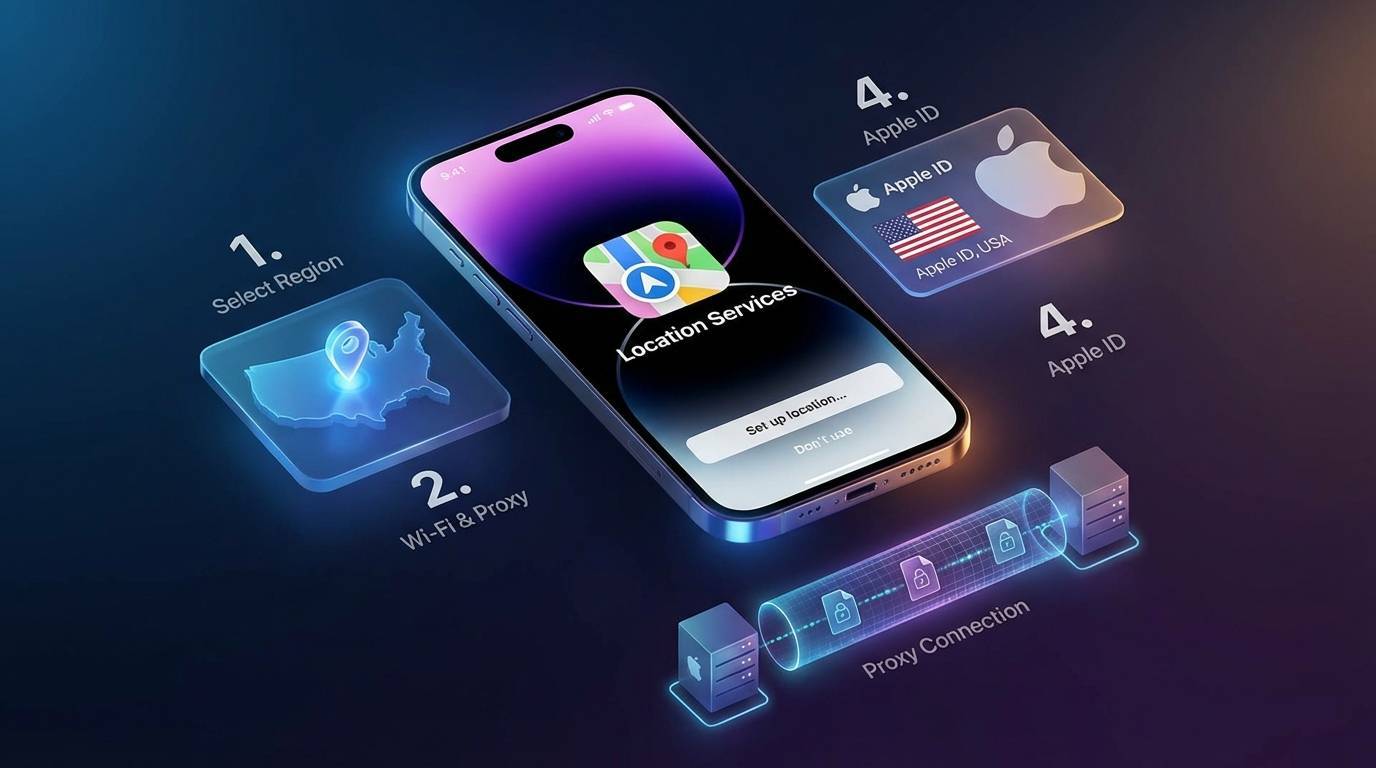
Prepare Clean Devices
Start with either brand-new or factory-reset phones. Refurbished iPhone 8 models offer the best balance of affordability (~$100) and reliability. Do not insert a SIM card unless it's US-based. These devices run current iOS versions, support all necessary apps, and are inexpensive enough to scale while maintaining the authentic device fingerprints that platforms trust.
Select a Dedicated US Proxy
Choose a reliable, dedicated 4G or 5G mobile proxy located in the United States. Budget approximately $65 per month per proxy. Avoid shared VPNs or low-quality proxies-these increase detection risk and account suspension rates significantly. Key requirements include dedicated (not shared) connection, US-based mobile IP address, 4G/5G cellular network, and stable connection with minimal dropouts.
Configure Device as US-Based
The initial device setup should occur while connected to US infrastructure. Ideally, perform initial setup while physically in the US. Alternatively, connect via WiFi through a US VPN router. As a fallback, use local WiFi then immediately switch to US proxy after setup completes. This ensures the device maintains consistent US geolocation data from first boot.
Create US Apple Account
Set up the Apple iCloud account while connected to the US proxy. Create a fresh Gmail address through the device or antidetect browser. Use services like TextPlus or OnOff for US phone verification numbers. Generate a valid US billing address using address generation tools. The Apple account must appear legitimately US-based to access the US App Store.
Add US Payment Method
Two approaches work for US billing. The recommended option is purchasing a $3-5 prepaid Apple gift card and redeeming the code-this is faster and simpler. Alternatively, create a dedicated US PayPal account using the same US phone number, then link it to a USD-based neobank card (Revolut, Wise, etc.).
Install Proxy Client
Download a rule-based proxy client app (ShadowRocket works reliably) to maintain stable, uninterrupted proxy connections. Enable Global Routing mode-this blocks internet access entirely if the proxy disconnects, ensuring the device never accidentally reveals its true location.
Verify Connection
Test the connection using IP verification services (WHOER or similar) to confirm the IP address shows US location, there are no DNS leaks revealing true location, and the connection remains consistent without dropouts.
Create Social Media Accounts
Create TikTok and Instagram accounts using US phone numbers (from TextPlus/OnOff) or anonymous email providers (ProtonMail, Tutanota). Critical rules: maximum 3 accounts per phone, space out account creation (one new account every two days), keep profiles completely blank initially (no bio, no profile picture), and wait until warmup completes before any customization.
How to Warm Up Accounts Properly
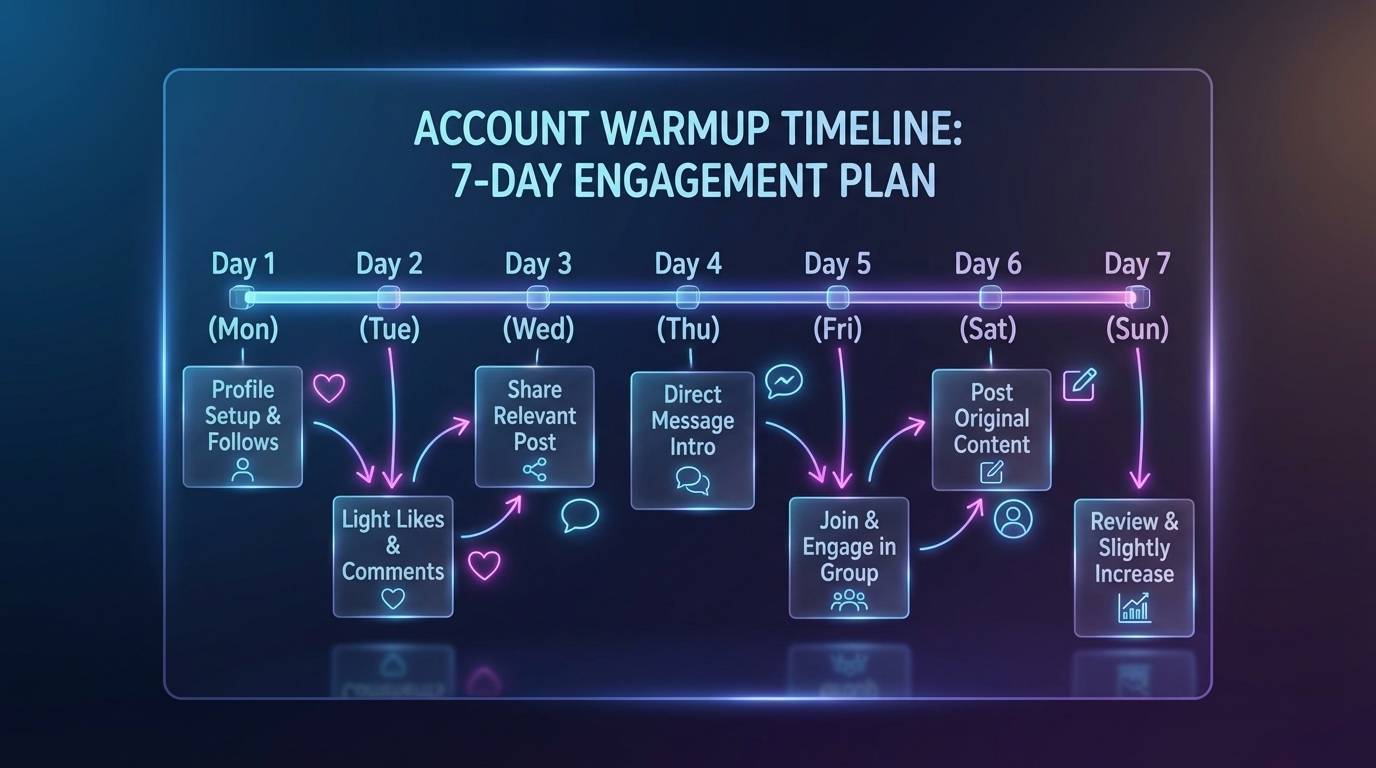
Once devices are configured and accounts created, the next critical phase is proving to algorithms that these are real human users. This requires 5-7 days of simulated natural activity before posting any content (7 days recommended for best results).
Why Warmup Matters
Algorithms evaluate new accounts based on behavior patterns. Accounts that immediately start posting without engagement history look like bots or spam operations. Properly warmed accounts receive algorithmic boosts because they've demonstrated genuine user behavior.
Skip warmup = content gets buried. Complete warmup properly = algorithms actively boost distribution.
The Account Warmup Essentials course covers detailed warmup protocols with day-by-day instructions.
Manual Warmup Process
Spend 20-30 minutes per day, per account on natural activities (15-20 minutes for Instagram):
Scroll Through Feeds
Browse content naturally, spending varied amounts of time on different posts to simulate genuine interest patterns.
Like Content in Target Niches
Engage with content similar to what you'll eventually post-this trains the algorithm to understand your account's focus area.
Save Videos to Favorites
Saving signals strong interest and helps establish your account as an engaged community member.
Leave Genuine Comments
Write thoughtful, relevant comments that add to conversations-avoid generic responses that look automated.
Follow Relevant Accounts
Build a following list of accounts in your niche to further establish your account's identity and interests.
Watch Videos Completely
Watch time matters significantly-complete video views signal quality engagement to the algorithm.
The first 20-30 minutes of warmup should always be manual-this trains the algorithm to understand what content the account should see and, more importantly, who should see content from this account.
Automated Warmup Methods
After initial manual warmup, automation can handle the remaining 90% of warmup activity.
Method 1: Voice Control Automation
iOS Voice Control allows assigning touchpad gestures to spoken words. Recording multiple gesture variations for scrolling, liking, and other actions makes phones voice-controllable. An AI or pre-recorded audio track can then randomly trigger these actions for extended warmup sessions.
Method 2: OTG Hardware Control
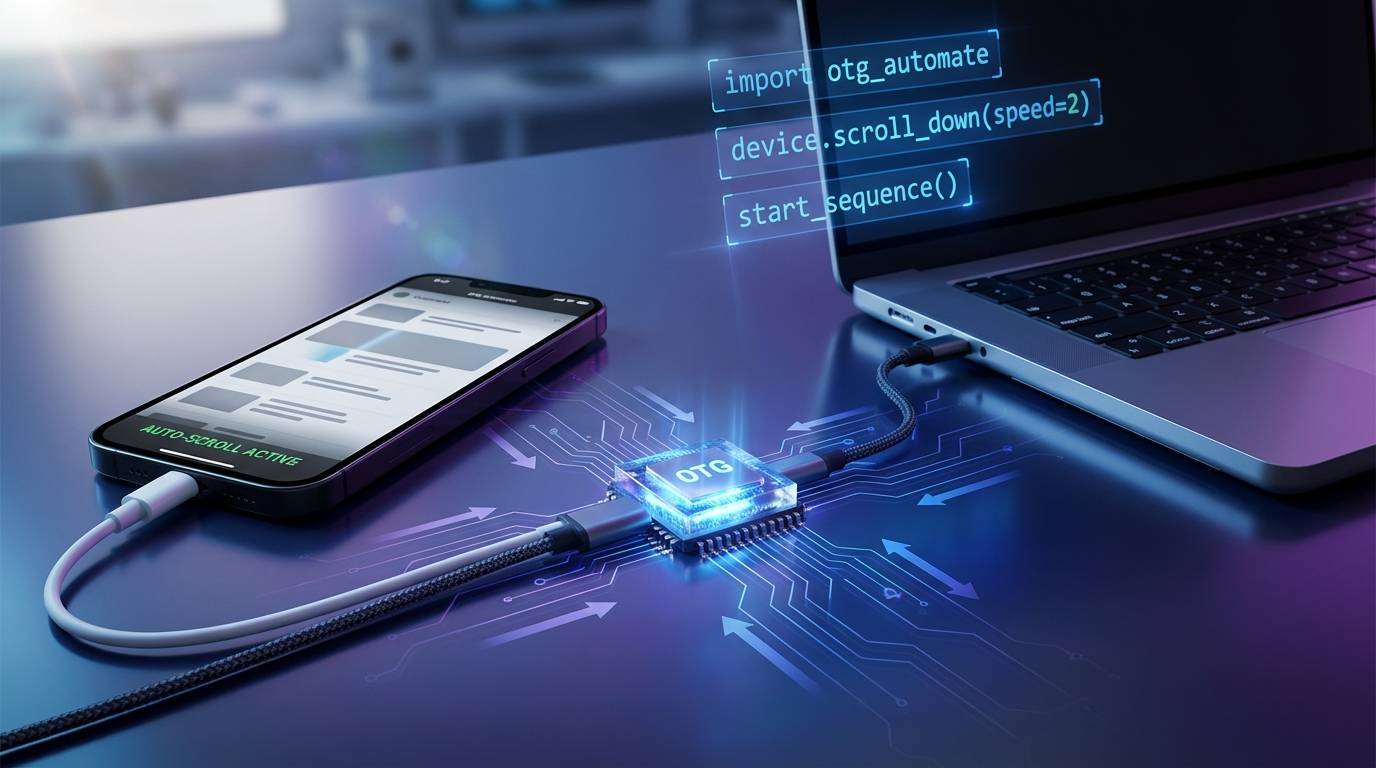
OTG (On-The-Go) hardware controllers plug directly into iPhones without jailbreaking or special app installation. These devices enable simulated taps and swipes, keyboard input, image and color detection, OCR capabilities, and script-based automation.
The setup requires only a small chip, OTG cable, and Type-C cable. Software runs over HTTP and WebSocket interfaces, compatible with Python and other languages. Systems work with iPhones from 6s onward running iOS 13.4+.
This approach supports stable connections via 4G SIM, WiFi, or direct cable connection.
The Multi-Account Setup course covers managing multiple devices at scale.
Scaling Your Farm Operation
Phase 1: 1-10 Devices
Manual management works at this scale. Focus on perfecting the setup process and warmup procedures before expanding.
Phase 2: 10-25 Devices
Introduce OTG control hubs to manage multiple devices from a single computer. One operator can efficiently manage 20+ devices with centralized workflows.
Phase 3: 25+ Devices
Hire a dedicated Head of Distribution. At this scale, device management, content deployment, account health monitoring, and performance tracking becomes a full-time role. Marketing agencies often build these capabilities to serve multiple clients.
The Automation & Teams course covers building teams for scaled operations.
Farm Workflow Integration
Once the farm is operational, integrate it with content production:
Content Organization
Content from Scale stage flows to organized drives with standardized naming conventions that make distribution efficient and error-free.
Distribution Calendar
Plan which content posts to which accounts and when-strategic scheduling maximizes reach and prevents content conflicts.
Account Folders
Maintain folders containing only content assigned to specific accounts, preventing cross-posting mistakes and duplicate content issues.
Drafts Preparation
Upload all weekly content to drafts before posting begins-this streamlines the publishing process and reduces daily workload.
Daily Publication
Include warmup engagement before and after each post to maintain account health and signal genuine platform participation.
For teams producing high volumes of content variations, tools like Renderfire can generate TikTok slideshows, UGC videos, faceless videos, and demo content that feed directly into distribution workflows. Whether you need to learn how to make TikTok slideshow content or scale organic marketing with AI, integrated platforms streamline the entire pipeline.
Common Mistakes to Avoid
Frequently Asked Questions
How many devices are needed to start a content farm?
Start with 3-5 devices to test and perfect the setup process. This provides enough scale to see meaningful results while keeping costs manageable (~$500-800 initial hardware plus ~$200-400/month for proxies). Scale up once processes are proven.
Why use physical phones instead of emulators?
Physical phones create authentic device fingerprints that platforms trust. Emulators produce detectable signatures that trigger bot detection. The higher upfront cost of physical devices pays off through better algorithmic treatment and dramatically lower ban rates.
How long does account warmup take?
5-7 days of consistent engagement before posting any content (7 days recommended for best results). Some operators extend to 14 days for maximum algorithmic trust. Rushing warmup directly correlates with poor content distribution. For detailed day-by-day warmup protocols, see the [Account Warmup Essentials](/free-marketing-courses/getting-started/account-warmup) course.
What happens if an account gets banned?
Individual account bans are expected at scale. The farm structure isolates risk-one banned account doesn't affect others on different devices with different proxies. Maintain a pipeline of new accounts in warmup to replace losses.
Can the same content post across multiple farm accounts?
Never post identical content across accounts on the same platform-platforms detect duplicates and suppress reach. Each account should post unique variations. Content produced through proper Scale processes naturally creates enough variations for multi-account distribution.
How much does a basic farm setup cost?
Initial hardware: ~$100 per device (iPhone 8) Monthly proxies: ~$65 per dedicated proxy For a 10-device setup: ~$1,000 initial + ~$650/month ongoing
Returns depend entirely on content quality-farms amplify existing performance, they don't create it.
Key Takeaways
- 1 Social media farms maximize content distribution through algorithm-friendly multi-device setups-but only amplify content that already performs well
- 2 Physical farms with real devices outperform virtual emulator setups for algorithm-friendly distribution despite higher costs
- 3 US-configured devices with dedicated 4G mobile proxies create the foundation for proper farm operation
- 4 Account warmup (5-7 days, with 7 recommended) is non-negotiable-skipping this phase guarantees poor distribution
- 5 Maximum 3 accounts per device with 48-hour spacing between account creation minimizes ban risk
- 6 Scale gradually: perfect the setup with 3-5 devices before expanding to 10-25, then 25+
More Posts
Ready to start automating?
Join hundreds businesses growing with Renderfire